1DCount
A counting channel your community plays together, with records, saves and ranks for profile cards.
1DCount turns a channel into a counting game. Members count up together, one number per message. The bot reacts to every number. A wrong number breaks the count and you start again, unless your server has a save to spend. Milestones and new server records are celebrated, and members earn counting ranks that show on their profile card and can boost their chat XP.
Every option is free and up to your server.
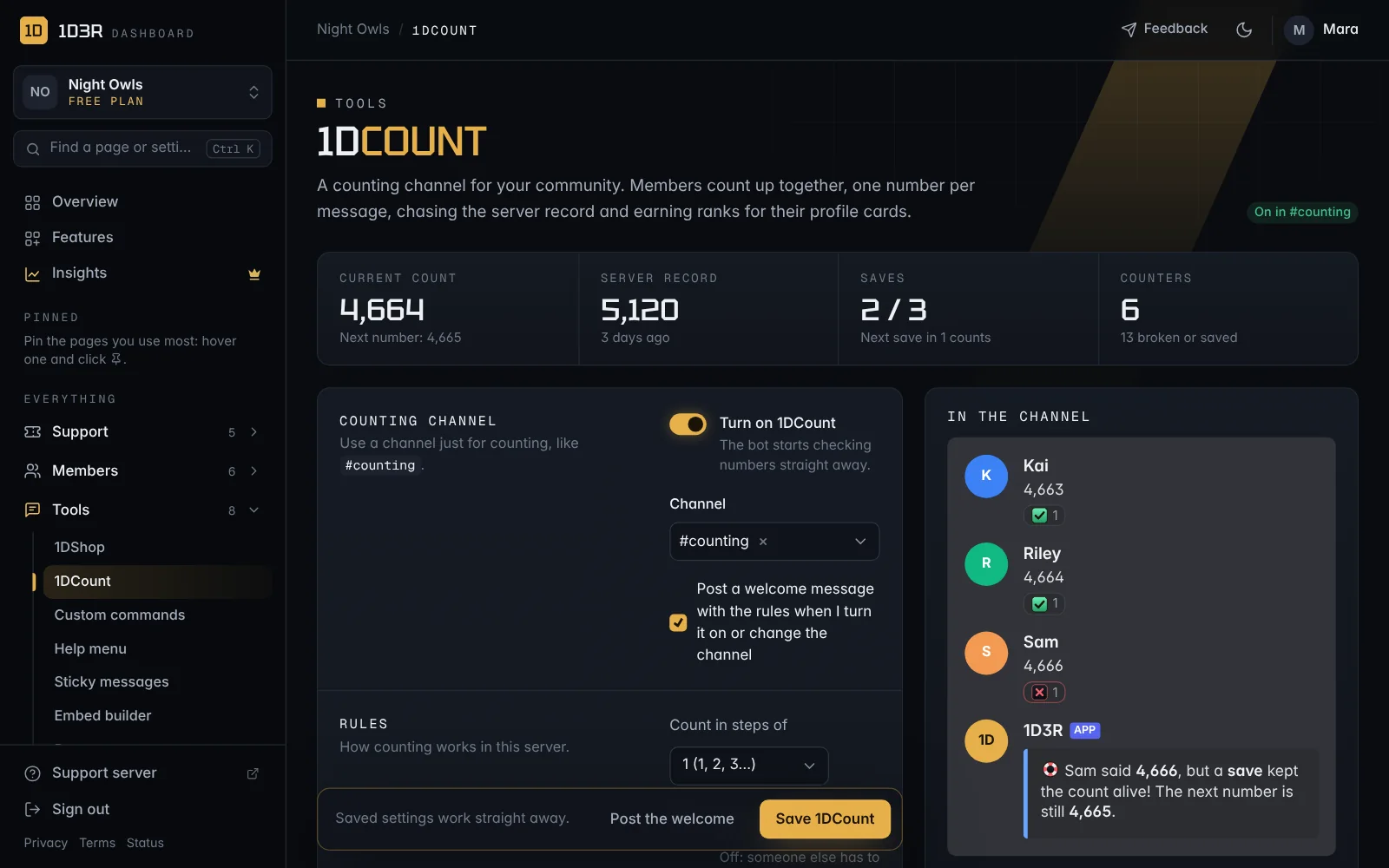
Set it up
- Create a channel for counting, for example
#counting. - In the dashboard, open 1DCount in the sidebar (under Tools).
- Switch on Turn on 1DCount and choose the channel.
- Leave Post a welcome message with the rules ticked, and press Save 1DCount.
The bot posts the rules in the channel, and members can start counting straight away. You need the Leveling dashboard permission to change 1DCount.
How counting works
- Each message has to be the next number. The bot reacts with a tick to a right number and a cross to a wrong one.
- By default you count 1, 2, 3. You can count in steps of 2, 3, 5 or 10 instead.
- Nobody can count twice in a row: someone else has to go next. Switch on Let people count twice in a row to allow it.
- Numbers can be written like
1000or1,000. A message can have text after the number, like42 nice. - With Allow math on,
5*20,200/2or(9+1)^2count as 100. It's off by default. - Messages that don't start with a number are left alone, so people can chat. Choose Delete them to keep the channel to numbers only (staff messages are never deleted).
- If two people send the same number at once, the first one counts.
- If someone deletes or edits the last right number, the bot posts it again so nobody is confused about what's next.
When someone gets it wrong
A wrong number, or counting twice in a row when that's not allowed, is a mistake. Choose what happens:
| Choice | What it does |
|---|---|
| Start again | The count goes back to the beginning. Classic counting. |
| Use saves | The server earns a save every so many right numbers (100 by default, up to 3 saves). A mistake spends a save instead of breaking the count. |
The bot posts who made the mistake, the number the count reached and the server record.
You can also add penalties for whoever breaks the count:
- Give a “count breaker” role for a number of hours. The bot takes it away by itself. The bot needs Manage Roles, and its role must be above that role.
- Take a break from counting: they can't count for 10 minutes up to a week. Their numbers are removed until then.
Reactions
- 1DCount emotes: the bot's own tick and cross. They work in every server with no setup.
- Classic: ✅ and ❌.
- Your own: any emoji, or one of your server's emotes. In Discord, type
\:name:to get the<:name:id>code to paste.
Celebrations
- Milestones: every 100 counts by default (or 25, 50, 250, 500, 1,000 or never), the bot celebrates.
- Records: when the count beats the server record, the bot says so once per run.
- Ranks: when someone reaches a new rank, the bot congratulates them.
Ranks
Members earn counting ranks for their right numbers. There are six ranks:
| Rank | Right numbers | Chat XP boost |
|---|---|---|
| Rookie Counter | 10 | none |
| Counter | 100 | +2% |
| Number Cruncher | 500 | +4% |
| Count Captain | 1,000 | +6% |
| Count Master | 2,500 | +8% |
| Count Legend | 10,000 | +10% |
You can rename any rank, change how many right numbers it needs and its XP boost (up to +50%), or remove it. Each rank can also give a role. A new rank's role replaces the previous one's.
- Show the rank on profile cards: the rank and its emblem appear on the member's
/profilecard. - Ranks boost chat XP: the rank's boost is added to the XP they get for chatting. Leveling has to be on.
- XP for every right number: give up to 50 chat XP per right number. 0 means none. Counting messages don't earn normal chat XP.
The /counting command
Anyone can use /counting to see the current count, the next number, the server record, saves, their own stats and rank, and the top 10 counters. Add a member to see their stats instead.
Give saves
With Use saves on, the server owner can give the server extra saves, for example as a reward for a big milestone or during an event.
- In Discord:
/givesave, with an optional amount (1 if empty) and a reason. The bot announces it in the counting channel, with the reason. - On the dashboard: the Give saves box on the 1DCount page does the same.
- Let others give saves: under Use saves, pick roles in Who can give saves with /givesave. The server owner always can.
- Over the limit: counting only earns saves up to your limit (3 by default), but saves you give can go past it, up to 25 in total. Extra saves are spent the same way.
Each gift shows up under Recently on the 1DCount page, and in the audit log.
Fix the count
On the 1DCount page, staff can:
- Fix the count: set the current count (and saves), for example if a few numbers were lost while Discord was down.
- Let them count: end someone's counting break early.
- Reset all counting stats: clears the count, the record, saves, everyone's counts and ranks. Type RESET to confirm. This can't be undone.